IntelHexToBin Converter

Command-Line Binary Conversion Tool

A powerful Java-based command-line utility for converting Intel HEX files to binary format. Supports memory range specification, custom address mapping, and batch processing for embedded systems development.

Java Application
CLI Tool
Open Source
.HEX
.BIN
Java

Key Features

Professional-grade file conversion with advanced options for embedded development

Intel HEX Support

Full support for Intel HEX format with all record types including data, extended address, segment address, and EOF records.

Memory Range Selection

Specify custom start and end addresses to extract specific memory regions from HEX files for targeted firmware updates.

Command-Line Interface

Simple and intuitive CLI with comprehensive help documentation and error handling for seamless integration into build processes.

Data Validation

Built-in checksum verification and record validation to ensure data integrity during the conversion process.

Embedded Systems Ready

Designed for embedded development workflows with support for various microcontroller architectures and compiler outputs.

Batch Processing

Efficient processing of multiple files and integration with automated build systems and continuous deployment pipelines.

Intel HEX Format

Understanding the structure of Intel HEX encoded binary files

File Format Overview

Intel HEX is an ASCII text-based file format that represents binary data in hexadecimal encoding. Each line (record) starts with a colon ':' and contains hexadecimal characters encoding the record type, data length, memory address, payload data, and checksum.

Intel HEX Record Format
Intel HEX Record Structure

RECORD MARK

ASCII colon ':' character indicating the start of a record

RECLEN

Number of data bytes (0-255) in the record

LOAD OFFSET

16-bit starting load address for data records

RECTYP

Record type: 00=Data, 01=EOF, 02=Extended Segment, 03=Start Segment, 04=Extended Linear, 05=Start Linear

DATA

Payload containing the actual binary data in hexadecimal

CHKSUM

Two's complement checksum ensuring data integrity
How to Use

Execute the JAR file from command line with various options

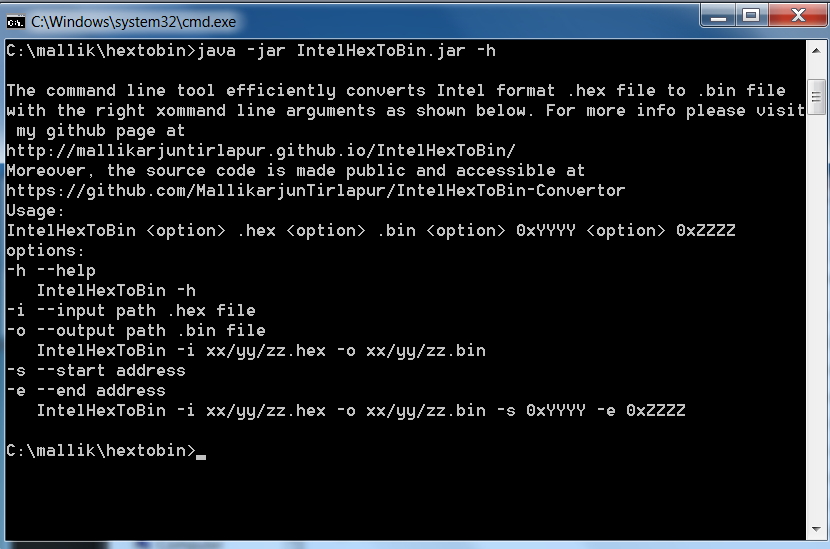
Help Command

Display usage information and available options

IntelHexToBin -h
Help Command Output
Help Command Example

Basic Conversion

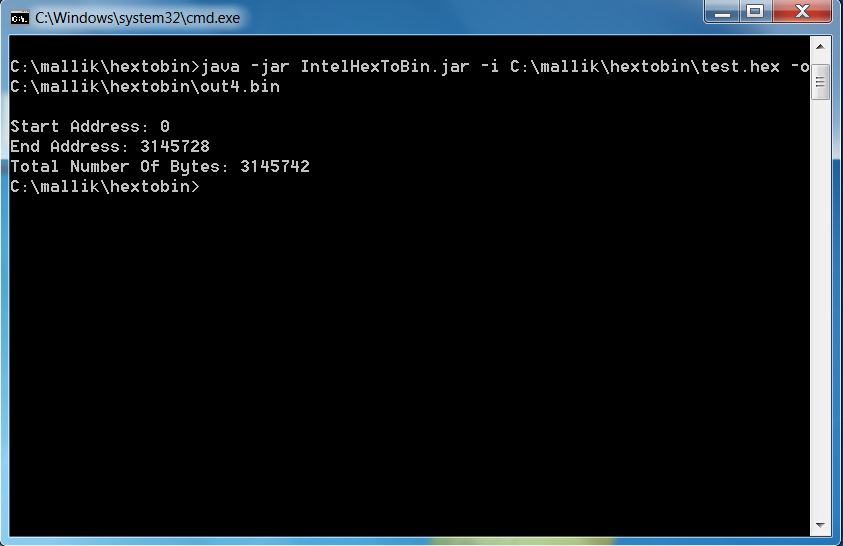
Convert an entire HEX file to binary format

IntelHexToBin -i input.hex -o output.bin
  • -i, --input Input HEX file path (required)
  • -o, --output Output binary file path (required)
Basic Conversion
Basic Conversion Example

Memory Range Conversion

Extract a specific memory range from the HEX file

IntelHexToBin -i input.hex -o output.bin -s 0x1000 -e 0x2000
  • -s, --start Start address in hexadecimal (optional)
  • -e, --end End address in hexadecimal (optional)